Agents
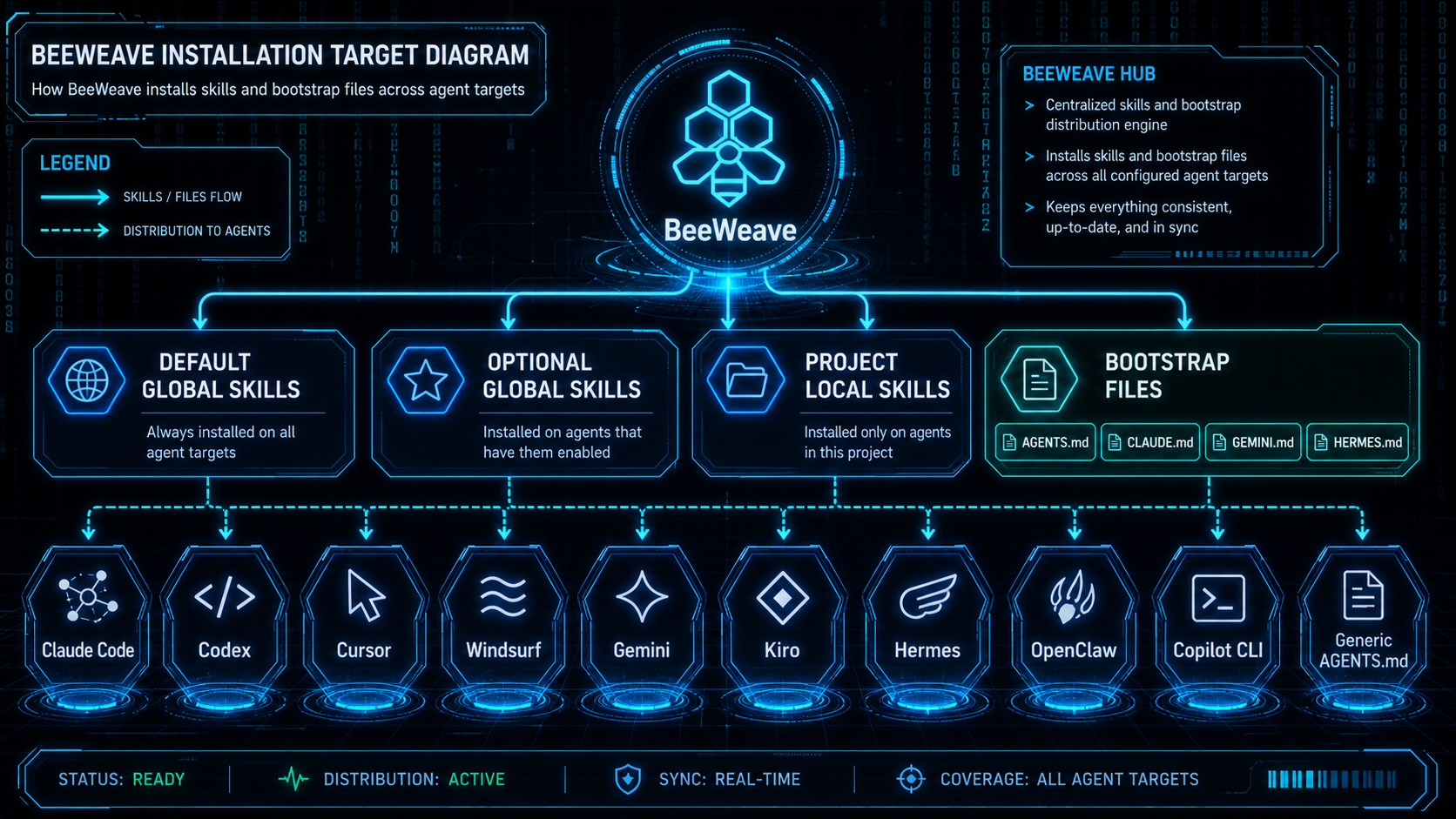
BeeWeave installs shared context and skills into the agents you choose during setup.
Supported Targets
claude, cursor, windsurf, generic, pi, kiro, gemini, antigravity,
codex, hermes, openclaw, copilot, trae, trae-cn
Project-local setup installs full BeeWeave skills and bootstrap files. Global setup stays intentionally small so other projects do not inherit the full BeeWeave workspace by accident.
Bootstrap Files
Depending on the selected target, setup can write files such as:
AGENTS.mdCLAUDE.mdGEMINI.mdHERMES.md- Cursor rules
- Windsurf rules
- Kiro steering
- Antigravity rules and workflows
- Copilot instructions
These files teach the agent how to use the same vault/ and workbench/
without trapping context inside one chat or one tool.
Install Strategy
- Global install: portable default skills and selected advanced skills.
- Project-local install: full BeeWeave skill set for the chosen workspace.
- Runtime data: created in the workspace, not in this repository.
OpenClaw Symlink Setup
BeeWeave installs OpenClaw project-local skills into .agents/skills. This is
OpenClaw's documented project agent skills root. The default BeeWeave setup uses
symlinks, so those entries may point to BeeWeave's installed package data
directory.
OpenClaw validates symlink targets for project-agent skill roots. If OpenClaw does not load BeeWeave skills after setup, choose one of these paths:
- Run
bwe setup --agents openclaw --copyto copy skills instead of symlinking. - Keep symlinks and add BeeWeave's installed skills data directory to
skills.load.allowSymlinkTargetsinopenclaw.json.
You can ask OpenClaw to resolve the target path and update its own config with this prompt:
Please fix BeeWeave skills not loading in OpenClaw.

Background:
- BeeWeave installed OpenClaw project-local skills into this project's `.agents/skills`.
- These skills may be symlinks.
- OpenClaw needs `skills.load.allowSymlinkTargets` in `openclaw.json` to allow symlink targets outside the project skill root.

Please:
1. Inspect this project's `.agents/skills` BeeWeave skill symlinks.
2. Resolve their real target paths.
3. Find the shared BeeWeave skills data directory.
4. Update `openclaw.json` by adding that directory to `skills.load.allowSymlinkTargets`.

Requirements:
- Preserve all existing OpenClaw config.
- If `skills.load.allowSymlinkTargets` already exists, append only missing paths.
- Show the path you plan to add before changing the file.